Sandbox V.2
 fangblade646
- 11,866 downloads
- 10 comments
- Uploaded 15 February 2012
- Updated 11 yrs ago
- Seed 7509360480271252232
- Archived world
About this world
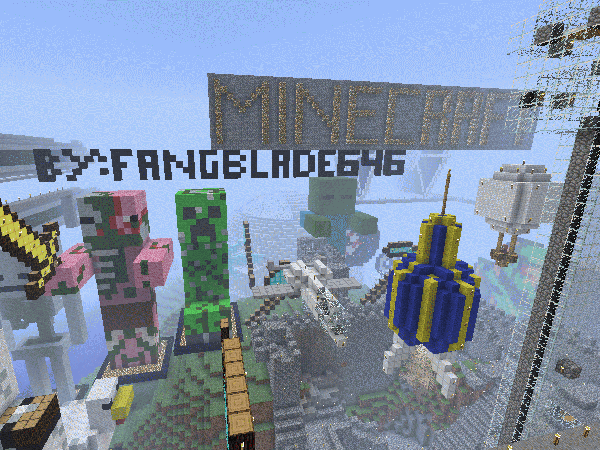
FINALLY UPDATED TO WORK ON ANY VERSION OF MINECRAFT!!! Thats right the world is now a kajillion times better on the latest minecraft release! And it looks like the picture!
started out as just a castle and turned into a compilation of a bunch of things. Many different peoples projects put together. Things built by me: Pixel art, starting castle, statues, A-10 Warthog, and the rocket ship.
Change log V.2:
- Added some pixel art of a sword, shovel, spade, axe
- Built a Zombie pigman statue
- Built a zombie, chicken, and skeleton statue
- Added weaponry on the millenium falcon
- Fixed up some holes in things
- Fixed some redstone stuff
- Removed some annoying blocks placed by a mod I had installed
- Added a nyan cat
- Built a rocket ship, hot air balloon, and A-10
- Added some new pixel art thats better
- Added in a huge aircraft carrier
- Added in two pirate ships
- Added a statue of me
Next update:
- Hope to build another star trek ship
- build another statue of a mob or something*
- work a bit on the death star
- Add some more pixel art of stuff*
- Light up the floating temple some more
If there's any problems leave a comment and I'll fix it
*comment suggestions if you want to see something built
Thanks!
started out as just a castle and turned into a compilation of a bunch of things. Many different peoples projects put together. Things built by me: Pixel art, starting castle, statues, A-10 Warthog, and the rocket ship.
Change log V.2:
- Added some pixel art of a sword, shovel, spade, axe
- Built a Zombie pigman statue
- Built a zombie, chicken, and skeleton statue
- Added weaponry on the millenium falcon
- Fixed up some holes in things
- Fixed some redstone stuff
- Removed some annoying blocks placed by a mod I had installed
- Added a nyan cat
- Built a rocket ship, hot air balloon, and A-10
- Added some new pixel art thats better
- Added in a huge aircraft carrier
- Added in two pirate ships
- Added a statue of me
Next update:
- Hope to build another star trek ship
- build another statue of a mob or something*
- work a bit on the death star
- Add some more pixel art of stuff*
- Light up the floating temple some more
If there's any problems leave a comment and I'll fix it
*comment suggestions if you want to see something built
Thanks!
Comments 10
Read-only archive: commenting is closed.
-How to upload your world - First, search "%appdata%" in your search bar. Then click the folder that says "Roaming". Go to the folder that says ".minecraft". then click the folder that says "saves". You should see a list of folders. These folders are all your worlds on Minecraft. Copy and paste onto your desktop the world that you want to upload to this site and then go to this site and click browse. find your copied minecraft world folder on your desktop and upload it to this site. Then click the upload button!
-Bh1001
Please tell me if this was helpful! :)
awesome map!!!!!!!!!!!!!!!!